







I have a virtual tour on my website and would like an audit.

I don't have a virtual tour yet, would love a demo to see how it works.

For many prospective students, a campus tour is their first meaningful interaction with a university. It helps them understand not only where they might study, but also whether they can imagine themselves belonging there.
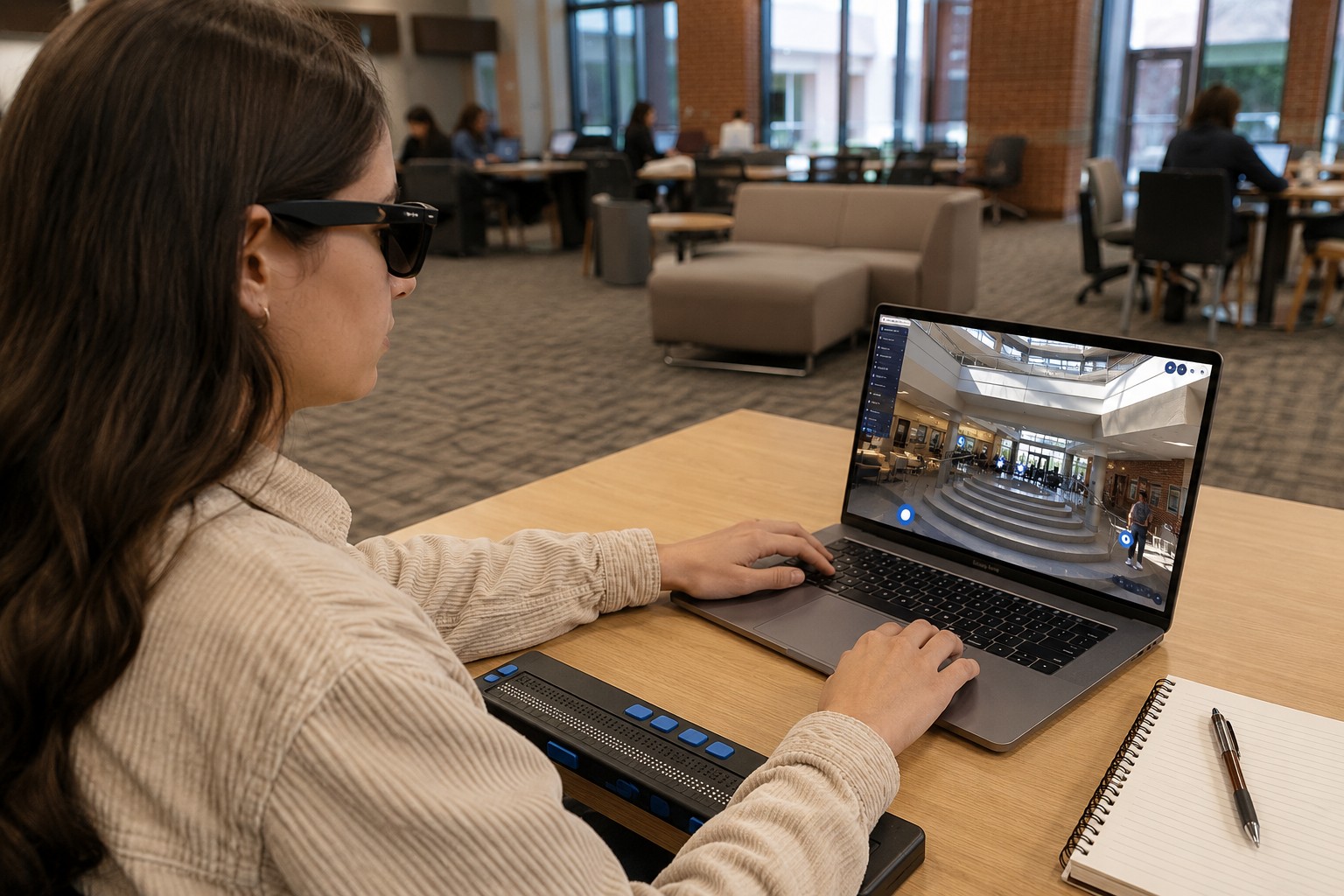
However, not every student is able to attend an in-person campus visit. Some live thousands of miles away. Others have mobility, visual, hearing, or cognitive disabilities that make traditional campus tours difficult or impossible. Even when a university provides a virtual tour, accessibility cannot be assumed simply because the experience is online.
An ADA-accessible virtual campus tour ensures that every visitor can independently explore campus spaces, understand information, and navigate the experience regardless of ability. Beyond meeting accessibility expectations, it demonstrates that inclusion begins long before enrollment.
This guide explains how universities can make virtual campus tours more accessible, why accessibility matters in digital campus experiences, and the practical principles institutions should follow when designing immersive virtual environments. Modern virtual tours already help institutions extend campus access, improve spatial understanding, and support informed decision-making for remote learners.
Key Takeaways
- ADA accessibility should be integrated into the design of virtual campus tours, not added afterward.
- Accessible virtual tours improve usability for students with visual, hearing, mobility, and cognitive disabilities.
- Interactive virtual tours provide greater spatial understanding than static photos or traditional videos.
- Accessibility strengthens transparency, inclusion, and confidence throughout the university selection process.
- An accessible digital experience supports both institutional accessibility goals and a better experience for every visitor.
Why This Topic Matters?
Universities increasingly rely on virtual tours because they communicate something that brochures, photographs, and campus maps cannot: how a place actually feels to navigate.
A student evaluating residence halls wants to understand how those buildings connect to dining facilities. A parent may want to see academic spaces before investing in travel. An international applicant needs a realistic understanding of campus life before making an enrollment decision.
When these experiences are inaccessible, the institution unintentionally creates another barrier.
Accessibility is not simply about legal compliance. It is about ensuring every visitor receives the same opportunity to understand the campus, evaluate facilities, and make informed decisions.
Accessible virtual tours also reinforce several important educational principles:
- Equal access to information
- Independent exploration
- Clear spatial understanding
- Inclusive digital communication
- Transparent representation of campus environments
Rather than replacing physical visits, virtual tours help more people begin their university journey with confidence by removing geographic and accessibility barriers.
What Makes a Virtual Campus Tour ADA Accessible?
ADA accessibility in virtual tours focuses on making interactive digital environments usable by people with different abilities.
Accessibility should consider every stage of the experience, including:
Keyboard Navigation
Not every visitor uses a mouse or touchscreen.
Students should be able to move throughout the tour, activate navigation controls, and access information using only a keyboard.
This creates a more independent experience for users with mobility impairments.
Screen Reader Compatibility
Students with visual impairments often rely on screen readers to interpret website content.
Interactive hotspots, menus, navigation controls, and informational content should include descriptive labels that allow assistive technologies to communicate what each element represents.
Without these descriptions, users may know an interactive element exists without understanding its purpose.
Alternative Text for Visual Elements
Virtual tours often include:
- Interactive icons
- Campus photographs
- Maps
- Building markers
- Informational graphics
Alternative text provides meaningful descriptions so visitors using assistive technology receive equivalent information.
Captions and Transcripts
If a virtual tour includes:
- Welcome videos
- Faculty introductions
- Student testimonials
- Narrated walkthroughs
Captions should accompany spoken dialogue.
Text transcripts provide another accessible option for users who prefer reading or use assistive technologies.
Logical Navigation Structure
A well-organized virtual tour helps every visitor understand where they are.
Instead of forcing users through a fixed sequence, accessible tours should provide clear navigation between:
- Academic buildings
- Residence halls
- Libraries
- Student services
- Athletic facilities
- Outdoor spaces
Predictable navigation reduces confusion and allows visitors to explore according to their own priorities.
Accessibility Begins with Clear Spatial Understanding
One of the greatest strengths of virtual campus tours is their ability to communicate space.
Accessibility extends beyond technical compliance—it also involves helping users understand how campus environments function.
Students benefit from seeing:
- how buildings connect
- walking routes
- entrances
- shared spaces
- classroom locations
- support services
Instead of presenting isolated photographs, immersive virtual walkthroughs create a connected understanding of campus.
This spatial clarity helps reduce uncertainty, especially for first-time visitors and students planning future campus visits.
Designing Interactive Content That Everyone Can Use
Interactive features enhance virtual tours, but only when they remain accessible.
Examples include:
Information Hotspots
Hotspots should provide concise, structured information that is readable, keyboard accessible, and compatible with assistive technologies.
Embedded Multimedia
Videos, audio clips, and image galleries should never become barriers.
Providing captions, transcripts, and descriptive text allows users to choose how they consume information.
Interactive Maps
Maps should support accessibility through:
- descriptive labels
- keyboard controls
- clear navigation hierarchy
The goal is helping visitors understand campus—not requiring perfect visual interpretation.
Supporting Different Accessibility Needs
Accessible virtual tours should recognize that accessibility is not limited to mobility.
Students with Mobility Disabilities
Virtual tours eliminate many physical travel barriers by allowing students to independently explore campus from anywhere.
They can revisit locations multiple times before arriving on campus.
Students with Visual Impairments
Screen reader support, descriptive content, structured navigation, and alternative text improve usability throughout the experience.
Students with Hearing Impairments
Captions and transcripts ensure that narrated content remains understandable without audio.
Students with Cognitive Disabilities
Simple navigation, consistent layouts, predictable controls, and uncluttered interfaces reduce cognitive load and make exploration more comfortable.
An accessible experience benefits all visitors—not only those with identified disabilities.
Virtual Campus Tours vs Static Photos
Static photography can showcase attractive buildings, but it provides very limited context.
A visitor might see a modern library without understanding:
- where it sits on campus
- how large it is
- what surrounds it
- how students move through the space
Virtual tours allow visitors to control exploration themselves.
Instead of viewing selected moments, they understand relationships between spaces.
This leads to better comprehension and more informed decisions.
Virtual Campus Tours vs Traditional Videos
Campus videos tell a story chosen by the institution.
Virtual tours allow visitors to create their own journey.
With video:
- viewers follow one sequence
- pacing is fixed
- revisiting information can be difficult
With interactive virtual tours:
- users explore independently
- navigation follows individual interests
- information remains available whenever needed
- visitors spend more time understanding spaces that matter to them
This level of control supports accessibility because different users process information differently.
Why Accessibility Improves Trust
Students evaluating universities are making one of the largest decisions of their education.
Accessible digital experiences communicate something important before any application is submitted:
“This institution considered every visitor.”
When universities remove unnecessary barriers, they create greater confidence among:
- prospective students
- parents
- international applicants
- students with disabilities
- remote learners
Transparency builds trust.
Accessibility strengthens transparency.
Together, they create better educational experiences from the very beginning.
Best Practices Universities Should Follow
When creating accessible virtual campus tours, institutions should:
Plan accessibility from the beginning
Retrofitting accessibility is more difficult than designing for inclusion from the start.
Test with assistive technologies
Accessibility should be evaluated using screen readers, keyboard navigation, and multiple devices.
Keep navigation consistent
Users should always understand:
- where they are
- where they can go next
- how to return
Write meaningful descriptions
Every interactive element should explain its purpose rather than relying on visual appearance alone.
Review accessibility regularly
As campuses evolve and virtual tours expand, accessibility testing should become part of ongoing maintenance.
FAQs
If a university offers digital experiences as part of its public-facing website, accessibility should be considered to ensure equal access for users with disabilities and to align with recognized accessibility standards.
No. Clear navigation, captions, structured content, and intuitive design improve usability for every visitor, including international students, parents, and mobile users.
No. They complement physical visits by helping prospective students understand campus before they arrive, reducing uncertainty and improving preparedness.
Keyboard navigation, screen reader compatibility, captions, alternative text, logical navigation, and descriptive interactive content are among the most important elements of an accessible virtual tour.
They allow more prospective students to independently explore campus regardless of location or physical ability, making the admissions process more inclusive and transparent.
Final Thoughts
Accessible virtual campus tours are not simply another digital feature—they represent a university’s commitment to making campus exploration available to everyone.
By combining immersive technology with thoughtful accessibility practices, institutions create experiences that help students understand physical spaces, evaluate campus environments, and make confident decisions from anywhere in the world.
As higher education becomes increasingly digital, accessibility will continue to shape how institutions communicate openness, transparency, and inclusion. Universities that build accessibility into their virtual experiences today are creating more welcoming learning environments for tomorrow.
I have a virtual tour on my website and would like an audit.
I don't have a virtual tour yet, would love a demo to see how it works.