




I have a virtual tour on my website and would like an audit.

I don't have a virtual tour yet, would love a demo to see how it works.

Universities can make 360-degree virtual tours accessible to students with visual impairments by providing screen reader compatibility, keyboard navigation, meaningful scene descriptions, and accessible alternatives to visual interactions. These features help students with blindness or low vision explore campus facilities, understand spatial information, and access essential content without relying entirely on panoramic imagery.
Why Are 360-Degree Virtual Tours Challenging for Students With Visual Impairments?
360-degree virtual tours rely heavily on visual exploration. Students typically navigate panoramic images by dragging, rotating the view, or selecting interactive hotspots.
These interactions can create barriers for students who are blind or have low vision. Important information about buildings, entrances, facilities, and campus layouts may be difficult to access when presented only through images.
Universities should ensure that essential campus information is available through accessible navigation and descriptive content, rather than requiring visual interaction alone.
How Can Screen Readers Improve 360-Degree Campus Exploration?
Screen readers convert accessible digital information into speech or braille output. However, panoramic images and interactive hotspots may not communicate useful information unless they are properly structured.
For example, a hotspot represented by an unlabeled icon may provide no indication of its destination.
Accessible virtual tours should include meaningful labels for navigation controls, locations, and interactive elements. Screen reader users should be able to identify available destinations and understand the purpose of each control.
What Makes Scene Descriptions Useful for Students With Visual Impairments?
A panoramic image may show several important campus features without explaining their relationship to one another.
Generic descriptions such as “university building” provide limited context.
More useful descriptions identify the location, its purpose, and relevant spatial information.
For example, a description of a university library might explain the location of its entrance, nearby facilities, and available study areas.
Descriptions should prioritize information that helps students understand and explore the environment rather than listing unnecessary visual details.
Why Is Keyboard Navigation Essential for Accessible Virtual Tours?
Some students with visual impairments use keyboards alongside screen readers or other assistive technologies.
Virtual tours that depend entirely on mouse movements, dragging, or clicking visual hotspots can prevent these students from navigating independently.
Accessible keyboard navigation should allow users to:
- Move between available locations
- Select interactive hotspots
- Open and close information panels
- Access multimedia controls
- Return to previous locations
Keyboard focus should also follow a logical sequence and remain identifiable throughout the experience.
How Can Universities Make Interactive Hotspots Accessible?
Interactive hotspots connect different scenes or provide additional information about campus locations.
However, visually positioned hotspots can be difficult to interpret without accessible names and descriptions.
A hotspot labeled only as “button” does not explain its function.
Universities should ensure that interactive elements communicate their destinations clearly. Labels such as “Enter Main Library” or “View Student Center” provide more useful information.
Hotspots should also be operable through keyboard navigation and compatible assistive technologies.
How Can Virtual Tours Support Students With Low Vision?
Students with low vision may be able to perceive some visual content but require adjustments to make information easier to understand.
Small icons, low-contrast text, and difficult-to-identify controls can create accessibility barriers.
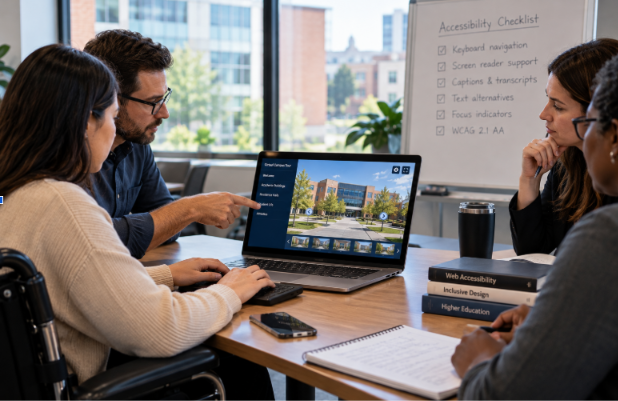
Virtual tour interfaces should support readable text, sufficient color contrast, visible focus indicators, and appropriate magnification.
Important controls should remain usable when students enlarge content or adjust display settings.
These improvements help students access information without depending on precise visual recognition.
Why Are Text-Based Alternatives Important for Panoramic Experiences?
Not every student can interpret a visual representation of a campus environment.
A text-based alternative can provide access to essential information without requiring users to navigate panoramic imagery.
Universities may provide structured location directories, descriptive building information, and accessible navigation links.
For example, a campus tour could offer a list of academic buildings with descriptions of their facilities and available services.
These alternatives should communicate the same essential information available through the visual experience.
How Can Accessible Audio Descriptions Improve Campus Understanding?
Some virtual tours include narration, but narration does not automatically make visual information accessible.
Audio may describe the university generally without explaining important visual details.
Meaningful audio descriptions can communicate information about building layouts, entrances, facilities, and relationships between campus locations.
Universities should ensure that essential visual information is available through appropriate descriptions, whether delivered as accessible text, audio, or another suitable format.
How Should Universities Test Accessibility for Students With Visual Impairments?
Visual inspection alone cannot determine whether an immersive campus experience is accessible.
Universities should evaluate how the tour functions with assistive technologies and alternative navigation methods.
Testing should include:
- Screen reader compatibility
- Keyboard-only navigation
- Meaningful hotspot labels
- Accessible scene descriptions
- Text resizing and magnification
- Color contrast
- Navigation order
- Text-based alternatives
Testing with people who have visual impairments can also identify practical usability barriers that automated accessibility tools may overlook.
What Are Common Misconceptions About Accessible 360-Degree Virtual Tours?
Adding alternative text makes the entire tour accessible.
Alternative text supports accessibility, but interactive navigation, controls, and scene transitions also require consideration.
Screen reader compatibility guarantees full accessibility.
A screen reader may identify controls correctly while important spatial information remains unavailable.
Audio narration replaces accessible navigation.
Narration can communicate information, but students still need an accessible way to choose locations and interact with the experience.
Accessibility only needs to be checked before launch.
New images, hotspots, navigation features, and multimedia can introduce barriers, making ongoing testing important.
FAQs
Yes, when essential information and navigation are available through screen readers, accessible controls, and appropriate nonvisual alternatives.
Meaningful visual information should have appropriate text alternatives so students who cannot perceive the imagery can access its content.
No, accessibility also depends on keyboard operation, meaningful descriptions, logical navigation, and accessible interactive elements.
Yes, accessible interfaces with readable text, sufficient contrast, magnification support, and clear controls can improve usability.
WCAG 2.1 Level AA provides relevant requirements for digital accessibility, including keyboard operation, text alternatives, contrast, and assistive technology compatibility.
Conclusion
Making 360-degree virtual tours accessible requires universities to address the limitations of visual-only campus exploration.
Screen reader compatibility, keyboard navigation, meaningful descriptions, accessible hotspots, and text-based alternatives can help students with visual impairments access important campus information independently.
By evaluating both technical accessibility and practical usability, universities can create more inclusive digital campus experiences while supporting recognized accessibility standards.
I have a virtual tour on my website and would like an audit.
I don't have a virtual tour yet, would love a demo to see how it works.